Sunday, February 28, 2016

Stored, Reflected and DOM XSS in Google for Work Connect (GWC)

Google for Work Connect (GWC) is "a community for system/application administrators and partners". GWC is in scope for Google bug bounty program though Google considers it a low priority application as far as reward amount is concerned. It is not about reward all the time. This blog (i.e., Respect XSS) is about XSS. Some time ago, I found Stored, Reflected and DOM XSS in GWC. 

Stored XSS

In GWC community, application administrators can share their ideas and help each other. The application allows users to create a document/posting/thread/message and among other features (e.g., mark as question, tags and category etc), the posting has a title or name and message body. The title of posting is of our interest in this case. The site was doing good in encoding < character into &lt; (if found in the title) (see screen-shot).


As you can see in the above screen-shot that < is encoded in an HTML context (i.e., <a> tag around reflection), so no need to waste time here. The site has another feature where one can do the same stuff but via Google Drive. The feature is labelled as "Add a file from Google Drive". In that case, at that time (now site has been updated and things may be bit different), the name of Google Drive file becomes the title of the post. The screen-shot shows the site's behavior when a file has been added from Google Drive. Please keep in mind that in Google Drive, I had first created a file named "xxxxxxxx'yyyyy</img>.PNG so that I can used that file here in GWC.


The screen-shot above shows reflection in GWC and and it can be seen that reflection was in script context in general and as a part of var declaration (i.e., object literal) in particular. The developers were using " for holding the title of file and at the same time, " and </ were not controlled or filtered or escaped. The XSS is now pretty straight forward, Please make sure that you have a file in Google Drive named </script><script>confirm(document.domain)</script>


This was an stored XSS because posting on GWC is available for all logged-in users. The root cause of this stored XSS was that GWC application forgot to control/encode/filter input from other application (i.e., Google Drive) though they were doing good on direct user-supplied input.

Reflected XSS

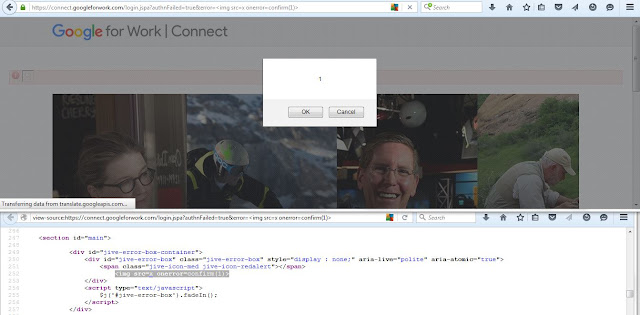
If somehow you're able to cause an error (e.g., file was not properly uploaded from Google Drive) in GWC then application throws an error message in a GET parameter named "googleDriveError". This GET parameter is vulnerable to a classical reflected XSS. Further if you're able to cause an authentication error, then application throws an error message as a part of GET parameter named "error". Both error related GET parameters were vulnerable and both were using the same code base. The screen-shot shows the reflection of our harmless probe string "xxxxxxxx'yyyyy</img as a part of  "googleDriveError" GET parameter.


It can be seen in the screen-shot that < is not filtered in an HTML context. It is enough of information. The next screen-shot shows reflected XSS in "googleDriveError" GET parameter followed by a reflected XSS in "error" GET parameter.


DOM XSS

I also found a DOM XSS in GWC. The culprit for DOM XSS was window.location.hash.substring(1) but the problematic JavaScript code executes only if someone marked/clicked the reply of a posting "Mark as Helpful". The vulnerable dynamic JavaScript code was part of a JavaScript file at that time (site has been updated and you will see a not found message). The vulnerable JavaScript code looks like ...

... {if(window.location.hash){c.scrollTo("a[name='"+window.location.hash.substring(1)+"']")} ...

There are two screen-shots given below. One shows where posting has not been marked "Helpful" and one shows where posting has been marked "Helpful". The DOM XSS payload was part of both cases but executes only in the later case.


GWC received an update recently so there is a great chance that this update has introduced some bugs. Happy Hunting ...  

Sunday, February 14, 2016

Keep An Eye On $.html, $.get and $.ajax Functions

The $.html(), $.get() and $.ajax() are potential XSS venues. Some of you're already aware of this but lets see real life examples from the wild.  Finding a real example from the wild is itself not an easy task but fortunately, I live on the web in general and view-source in particular, so I found one. At the same time, instead of cosmetic bypasses i.e., bypasses based on assumptions or without examples or bypass for the sake of bypass, I am only interested in real cases. It is always good to see how developers use jQuery's features in the wild. Some time ago I did a blog post on third-party jQuery based sinks.

$.html(htmlString)

According to jQuery, $.html(htmlString) sets the HTML contents of each element in the set of matched elements. Please open the following URL.


The screen-shot shows the reflection of our interest i.e., in $.html(htmlString) function. The developers're using single quote ' for holding the HTML contents inside $.html(htmlString) function and it can be seen that ' from the probe string ( i.e., "xxxxxxxx'yyyyy</img) is not controlled.


The XSS in this case should not be a problem. The URL at the time of XSSing is given below and the screen-shot is also there.


$.get()

According to jQuery, $.get() loads the date from the server via HTTP GET method. Open the following URL (q GET parameter holds our harmless XSS probe string i.e., "xxxxxxxx'yyyyy</img).  The screen-shot shows the reflection of probe string in $.get() function.


It can be seen in the screen-shot that developers're using " for holding the value of first parameter of $.get() function i.e., url and " is not filtered or encoded or escaped. The XSS in this case should not be a problem and it is simple and straight forward. The URL at the time of XSSing is given below and the screen-shot is also there.


$.ajax()

It is used to perform asynchronous HTTP request. The screen-shot shows the reflection of XSS probe string inside $.ajax() function. The developers're using ' for the data section of $.ajax() and it can be seen that ' is not controlled. Further </ is also there in its hard-coded form. I would like to refer you to the article for the detailed syntax of $.ajax().


It is an easy and simple task to XSS this case given ' and </ are not controlled in $.ajax() function. The XSS attack payloads like '-confirm(1)-' and </script><script>confirm(1)</script> work here. I already explained in earlier posts how payloads like '-confirm(1)-' or "-confirm(1)-" work. The screen-shot shows an XSS.


Before conclusion, I would like to say that I am still looking at $.post() and $.load() based XSS in the wild ( both are also potential XSS venue ). If I will find one, I will update this post. I conclude on a saying: "Simplicity is natures first step, and the last of art." Philip James Bailey.

Sunday, February 7, 2016

Find The Root Cause

This time instead of publishing a new blog post, I present two real life XSS example cases from the wild. I already XSSed both cases for you. Your job is to find the root cause and explain it in the comment section or send it to me via Twitter or email. The first best detailed explanation of the following two real life example cases will receive a small token of appreciation from my side. 

1) Open the following URL in Firefox browser:


The screen-shot is also given below.


Your task is to explain how this XSS works to a naive user or beginner. A sort of indirect hint is available in one of my earlier blog posts.

2) Open the following URL in Chrome browser:


Isn't my harmless XSS probe string ("xxxxxxxx'yyyyy</img) part of URL :D The screen-shot is also given below.


Your task is to explain this XSS to a naive user or beginner. In fact the root cause of this XSS is: developers often do not follow the very basic and first principle of security.

I hope it would be fun.

Participants

-- Serious effort by @Zemnmez:

http://pastie.org/private/zgr3xxoj7e6shanmixrlw & http://pastie.org/private/lpxgyc9iikn9z674pswsqg

-- Attempt by @omeriko_9:

https://twitter.com/omeriko_9/status/696299928717565952

Sunday, January 31, 2016

The Magic of Connecting The Dots

Macy's (http://www.macys.com/) calls itself "the magic of macy's" (at least the word magic is mentioned on their main home page logo). It has a global Alexa rank of 241 at the time of writing. It is a high profile web application. I think not from security perspective but from traffic point of view. Let the game begin. Please open the following URL (keyword GET parameter holds our harmless XSS probe string i.e., "xxxxxxxx'yyyyy</img). The following screen-shot shows reflection of our interest and some other cool things.


Lets start connecting few dots ...

The following line (in particular line #1911 in the screen-shot above and I marked it with label "Seems Interesting (3)") of JavaScript code (keywordsearch = kws.replace(/"/g,'\\\"');) replaces the " globally in the input with \\\" i.e., developers try to escape " with the help of three backslashes. Though escaping with three backslashes works fine given developers're using double quotes for holding the input in script context in general. Normally one backslash like \" (for double quotes) or \\ (for backslash) is enough (e.g., see line #21 in the source code in Chrome).


Note: FYI, on YouTube Gaming web site, you will find escaping with single backslash (i.e., \") and escaping with three backslashs (i.e., \\\") on the same page. Please see line #204 and line #200 in the source code in Chrome browser respectively.

So far so good from the application perspective but wait ... What about backslash (\) if injected in the attack payload? Are they escape backslash? Some of you might remember the blog post I did sometime ago and it was related to backslash. At that time I mentioned, my quest for backslash based XSS will continue and I think I am done with it (you will see when you're done reading this post). For example, open the following URL (http://www1.macys.com/shop/search?keyword=\) and if you will look into the source code, backslash is not escaped (see screen-shot below).


The following XSS attack attack payload can do the job for us i.e., \"; confirm(1); //. The URL looks like: www1.macys.com/shop/search?keyword=\";%20confirm(1);%20//. Some of you might be thinking why I started the payload with \. I explain but first look at the screen-shot of injection i.e., \"; confirm(1); //.


The injected XSS payload \"; confirm(1); // becomes \\\\"; confirm(1); // because " is replaced by \\\" in order to make it an escape character and at the same time, \ is not escaped. In short we have four backslashes in the reflection. Further, please remember, we're inside double quotes because developers're using them for keywordsearch variable declaration. The JavaScript code snippet looks like keywordsearch = "\\\\"; confirm(1); //"; How to interpret this code? The number of backslashes as far as one or three or five (i.e., odd number) is concerned, it is fine but if the count is even number i.e., two or four or six ... & so on then it will make the effect of escaping NULL N VOID.

In short, double quote is no more an escaping character because of four backslashes. The browser will consider it a proper closing double quote (in pair) for a variable declaration. In the XSS attack payload, now comes ; which is a statement terminator. It is followed by a proof of concept JavaScript function call i.e, confirm(1);. Last but not the least, we have a single line comment (i.e., //) in order to neutralize the effect of closing ";. It seems all set for an XSS and the following URL will result in an XSS: www1.macys.com/shop/search?keyword=\";%20confirm(1);%20//. Unfortunately NOT... but why? The game is still on ... It is about connecting some dots.

If you look at one line (i.e., line #1949 because line #1950 is a comment ) above the keywordsearch variable declaration that holds our reflection then you will realize that there is a conditional statement and it is not executed. It means that the control never reaches at the reflection or injection point because the conditional statement evaluates to false at the moment. Why false? The conditional statement is:

if(currentPageUrl.indexOf("cm_kws")!= -1) 

while currentPageUrl is a variable i.e., var currentPageUrl = window.location.href.  The window.location.href returns the current location of the document and assigns it to the variable currentPageUrl. The URL at the moment is http://www1.macys.com/shop/search?keyword=\%22;%20confirm(1);%20//. The JavaScript string function indexOf returns the first occurrence of the specified value, otherwise returns -1. The specified value in the indexOf function is "cm_kws". The current URL has no occurrence of "cm_kws". It means inside conditional statement, currentPageUrl.indexOf("cm_kws") evaluates to -1 and we all know that -1 != -1 is false :) The end goal is to make this conditional statement true so that the control reaches at the point of reflection and we will be able to execute JavaScript code of our choice.

I think, it is possible to force conditional statement so that it evaluates to true by appending the specified value i.e., "cm_kws" in the URL given currentPageUrl gets the value from window.location.href as I mentioned earlier and can be seen in the screen-shots. The job can be done by adding a new GET parameter named "cm_kws" like http://www1.macys.com/shop/search?keyword=\%22;%20confirm(1);%20//&cm_kws or by simply padding the string "cm_kws" at the end of URL like http://www1.macys.com/shop/search?keyword=\%22;%20confirm(1);%20//cm_kws.  In case of adding a new GET parameter "cm_kws", the statement currentPageUrl.indexOf("cm_kws") inside if evaluates to 66 and we all know 66 != -1 is true. In case of padding "cm_kws" at the end of URL, the statement inside if evaluates to 65 and we all know that 65 != -1 is true. The screen-shot given below shows the results of evaluation for better understanding.


It seems all set for an XSS i.e., dots have been connected. The following URL shows a confirm box followed by screen-shot.


For the sake of completeness, I wanted to XSS it with </script><script>confirm(1)</script> given in the reflection (see first screen-shot) </ is not filtered or encoded. The URL looks like ...


It has been blocked by some kind of protection layer. I think WAF or any other protection mechanism (e.g., IPS/IDS) stops the payload. The screen-shot shows Access Denied.


I had seen the same screen-shot on Akamai's site. It makes sense to believe or reasonable to believe that Akamai is not using other vendor's security solutions :) Isn't it? Akamai has its own WAF also i.e., Kona. Builtwith also gives some information that site is using Akamai's hosting services. Further, I am still interested if somebody will tell me or confirm which WAF is in place over there. Your feedback is always welcome.


WAF is meant to bypass and this one is not different. As I said earlier that </script> was blocked but </script%0Aanything> was not blocked. The following are quick bypasses and the screen-shot related to the second URL is also given below.


Before conclusion, I noticed that Macy's allowed to have single (') and double quotes (") in the product name (in case if required). I was thinking that it would not be easy for them to handle single (') and double quotes ("). For example, see the following two products ...


A question came to my mind: what will happen if I will do a search query of the product that have single (') and double quotes (") in their name. How site will treat it? Lets make a search query. I query for the following string i.e., a legit product name having both types of quotes ...

Under Armour Men's Raid Performance 10" Shorts

The resulting URL is:


It returns 3 results at the time of writing. Now lets look at the source code and try to figure out any thing interesting. As expected, site starts breaking itself :) The first thing I noticed is a legit search query breaks the attribute context (see screen-shot below).


The second interesting reflection in that case was in script context. It can be seen in the following screen-shot. The screen-shot shows that " from the product name is not escaped or filtered or encoded.


It means that we can leverage the " from the existing product name in constructing the XSS attack string. The XSS payload looks like (please see that the proof of concept JavaScript code does not start with " because we will use the " from the product name):

-confirm(1)-"

Now combine this proof of concept XSS payload with the legit search query we made earlier. The final attack string will be ...

                        Under Armour Men's Raid Performance 10"-confirm(1)-" Shorts

The URL at the time of XSS is given below followed by a screen-shot.


I conclude on a saying: "When You Really Pay Attention, Everything Is Your Teacher." (Ezra Bayda)

Sunday, January 24, 2016

Unusual Reflections

This post is about unusual reflections i.e., when user-supplied input reflects back or ends-up at an unusual place. I will show unusual reflections with the help of four live examples.

-- Reflection in src Attribute of <script> Tag:

This is really unusual when you're getting a reflection as a part of src attribute of <script> tag. The site FAKT.PL has a global Alexa rank of 2296 at the time of writing. Please open the following URL (our harmless probe string ("xxxxxxxx'yyyyy</img) is part of q GET parameter's value):


The screen-shot shows the reflection of our interest.


It can be seen in the screen-shot that developers're using " for holding the value of src attribute and " from the XSS probe string are not filtered. At the same time, </ is not controlled and in my experience, there is a great chance that > is also not controlled. The URL at the time of XSSing is given below followed by a screen-shot.


-- Reflection in SQL Statement:

The title of this heading sounds interesting i.e., when user-supplied input reflects back on the web page as a part of SQL statement. Isn't it? This is happening in the wild. Please open the following URL: http://search.gmw.cn/epaper.jsp. The site GMW.CN has a global Alexa rank of 54 at the time of writing. On the URL, you will find a search bar and lets input our harmless XSS probe string ("xxxxxxxx'yyyyy</img) in the search bar. The screen-shot shows the reflection of our interest. 


The screen-shot above shows our XSS probe string reflects back on the page as a part of where clause of SQL statement. Further <textarea> tag is around the input reflection (HTML context) and its style attribute has been set to "display:none". Furthermore, </ is not filtered or encoded in reflection. Though this is an HTML context and one can assume that the XSS attack payload <img src=x onerror=confirm(1)> will simply work but in-fact it does not because of <textarea> tag around. The </textarea> tag engulfs the contents except its closing counterpart. In order to make the attack payload works, first close the </textarea> tag prematurely and then you can execute the XSS attack payload of your choice. In short, the final attack payload looks like: </textarea><img src=x onerror=confirm(1)> . The screen-shot given below shows the XSS. I was also thinking: WTF SQL statement is doing on the page? Why developers're exposing their database table(s) structure on the web page?


 -- Reflection in alert() Function:

As a part of XSS proof of concept demonstration, we normally use alert() function. I found an exceptional case where user-supplied input ends-up as a part of alert(). Sometime ago, I did a write-up on JavaScript's built-in functions as reflections but alert() is somehow unique because reflections in other functions are common. I can not name the web site in this case but the following screen-shot shows the reflection of XSS probe string ("xxxxxxxx'yyyyy</img) in alert(). The screen-shot also shows " and < from the probe string are filtered but ' is not filtered while at the same time, developers're using single quotes for holding the value.  


For better understanding and XSS this case, first look at the source code of our interest without any injection: <script>alert('For input string: "83845138c47691"');</script>. The numeric value in the alert() function was part of a GET parameter i.e., it might be controlled by the attacker. In order to XSS this case, we have an apparent two choices (given " and < are filtered as can be seen in the screen-shot above).

  1. '-confirm(1)-' 
  2. ');confirm(1);//

In the first case, we break the context with ' and than with the help of JavaScript string operation (minus operator used in this case i.e., In JavaScript, you can subtract anything from anything as long as the syntax is valid), we execute arbitrary JavaScript code (i.e., during string expression evaluation inside alert(), we execute confirm(1).). The second choice lies under the category of "respect the syntax". It means first break the context with ' and than prematurely closes the alert function call with small parenthesis i.e., ) followed by a statement terminator ;. After that proof of concept confirm(1); followed by a single line comments (//) in order to neutralize the affect of closing "');. Here is the screen-shot shows the XSS. I used the second choice from above as a payload.


 -- Reflection in GET parameter name:

This is the case where you will see reflection as a part of GET parameter name along with the value. Normally, the value of a GET parameter is or may be controlled by the attacker but in this special case, an attacker may controlled the name of GET parameter. The BAIDU.COM has a global Alexa rank of 4. Please open the following URL (our harmless probe string ("xxxxxxxx'yyyyy</img) is part of q GET parameter's value):


The screen-shot shows the reflection. It can also be seen that ", ' and / are escaped so it seems no chance to XSS this particular injection point.


So far there is nothing unusual. The interesting thing is if I replace the GET parameter q with probe string ("xxxxxxxx'yyyyy</img) and see the reflection after submission again. I mean now the above URL looks like:


The screen-shot shows the reflection.


The site has recently added protection i.e., escaping of ", ' and / on the Left-Hand-Side (LHS) of =. Sometime ago, they're only doing escaping on the Right-Hand-Side (RHS). I was able to XSS it because of this exceptional reflection on the LHS of =. I conclude on a question: How often during a pen-test you guys try to manipulate a GET parameter name? 

Sunday, January 17, 2016

if --- Reflection Point

In this post, I will discuss with the help of two real examples about `if` reflection point i.e., when user-supplied input reflects back as a part of conditional statement in JavaScript. Please open the following URL (our harmless XSS probe string "xxxxxxxx'yyyyy</img is part of GET parameter q). The screen-shot given below shows the reflection of our interest i.e., part of conditional statement. 


The screen-shot shows that developers're using single quote (') for holding the value of user-supplied input and ' from the probe string ("xxxxxxxx'yyyyy</img) is not filtered or encoded. Further </ is also there in hard-coded form. One potential way to XSSed this case is '-confirm(1)-'. This will execute because at the time of expression evaluation inside `if`, our proof of concept JavaScript is executed. The URL at the time of XSSing is: http://www.pressdemocrat.com/search?q=%27-confirm(1)-%27 and the screen-shot is also given.


For the sake of completeness, I wanted to XSS this case with the help of </script><script>confirm(1)</script> but realized that this does not work even though </ was not filtered or encoded as I mentioned earlier when we're looking at the probe string reflection (see first screen-shot on the page). In short, the URL does not result in an XSS:


I decided to dig deep and found that they have some sort of filtering in place. The screen-shot given below shows the XSS vector </script><script>confirm(1)</script> does not reflect back at all.


If you will come across that type of case, I would suggest try the following valid variations (there are some others ... please figure out and take it as an exercise, now you have a live test-bed from the wild) and have already seen in the wild (at least 3 to 4 different occasions) that they work and bypassed the filtering mechanisms. The valid means: browsers render it.

</script%20><script%20>confirm(1)</script%20> // a space (i.e., %20) before closing > sign
</script%0a><script%0a>confirm(1)</script%0a> // new line (i.e., %0a) before closing > sign

The following URLs result in an XSS (choice is yours) and the screen-shot related to the %0a case is also given. The effect of %0a can also be seen in the screen-shot.


Now lets see another example from the wild. Please open the following URL (our harmless XSS probe string "xxxxxxxx'yyyyy</img is part of GET parameter rgnCd). The screen-shot given below shows the reflection of our interest i.e., part of conditional statement.


The screen-shot shows that developers're using single quote (") for holding the value of user-supplied input and " from the probe string ("xxxxxxxx'yyyyy</img) is encoded. Further < is also in its HTML encoded form. It seems no chance to break the context but the point I wanted to make is `if` is also a reflection point in the wild. Some of you might remember the blog post I did for breaking the SAP's SuccessFactor's XSS filter. In that case, the reflection of our interest was also part of conditional statement.

Wednesday, January 13, 2016

Persistent XSS in Mozilla Add-Ons Site

I do not know how but somehow I ends up on Mozilla's add-ons site. The site provides logged-in user an option or feature to create collections. According to Mozilla, "collections are group of similar add-ons that anyone can create and share". The collections are publicly view-able because site provides a unique URL per collection. The site has a form (available here) having fields like Name, Description and the add-ons for the creation of collection. The Name field of the collection form was vulnerable to a stored XSS. 

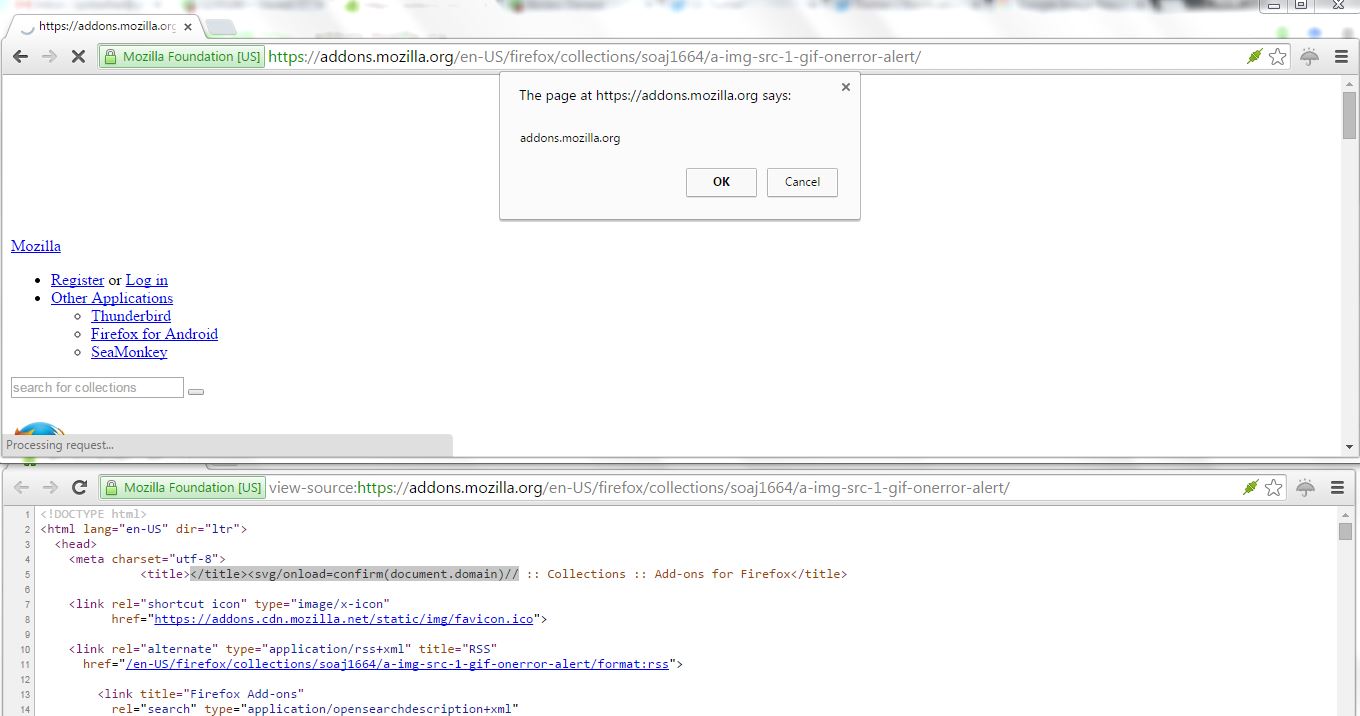
I created a collection having a Name "xxxxxxxx'yyyyy</img in order to see the behavior of site regarding special characters in the Name. The collection can be seen here: https://addons.mozilla.org/en-US/firefox/collections/soaj1664/xxxxxxxx-yyyyy-img/. The screen-shot shows the reflection of our interest i.e., as a part of <title> tag. One can see in the screen-shot that < is not encoded or filtered in an HTML context i.e., <title> tag around the reflection of probe string. 


For XSSing, when you're in <title> tag and < is not encoded or filtered then by simply closing the title tag prematurely with the help of </title> does the job for you and after that one can execute JavaScript code of his or her choice.  The payload I used for XSS looks like </title><svg/onload=confirm(document.domain)//. The screen-shot shows the persistent XSS. The URL where it can be seen at that time (before fixed is deployed) is: https://addons.mozilla.org/en-US/firefox/collections/soaj1664/a-img-src-1-gif-onerror-alert/. The stored XSS is now fixed. Isn't it that simple :)


I filed a bug (https://bugzilla.mozilla.org/show_bug.cgi?id=1235190) on 26-12-2015 and it was fixed on 07-01-2016. Mozilla awarded me 2500$ for this persistent XSS that can be used to serve malware, malicious campaign or drive by download. I was informed that soon Mozilla will release a notice/advisory here: https://www.mozilla.org/en-US/security/advisories/.

Further I found two more XSSes (low profile) i.e., one in Mozilla add-on (https://addons.mozilla.org/en-US/firefox/) and one in Mozilla Support site (https://support.mozilla.org/en-US/). The XSSes are not yet fixed and I will update this post once fixed will be deployed for these two XSSes. The XSSes are now fixed.

1) Self-XSS in Edit Review Feature of Mozilla Add-on Site: The bug can be found here: https://bugzilla.mozilla.org/show_bug.cgi?id=1237967 and deployed fix information can be seen here:

2) Self-XSS in Mozilla Support Mobile Site's Main Search Bar: The reported bug is here: https://bugzilla.mozilla.org/show_bug.cgi?id=1238252 and the deployed fix can be seen here: https://github.com/mozilla/kitsune/commit/8eefb30593013e1fb69ed4b4724ef5d457e020bf