Showing posts with label Escaping. Show all posts

Wednesday, April 6, 2016

Pairing Single Quotes

During pentest, I came across an interesting and unusual case where developers're trying to escape a single quote (') via a single quote (') in an script context. Further, I noticed that they were adding ' on the right hand side of the injected single quote. The developers're trying to have single quotes in pair but why? Are they trying to escape or something else? It sounds unfortunately funny and at the same time shows XSSing is not going anywhere in the near future.

The screen-shot given below shows the reflection of our interest. Please keep in mind that I had used the harmless XSS probe string i.e., "xxxxxxxx'yyyyy. The < sign is not part of probe string given site has enabled .NET's XSS protection. The site forcefully redirects me to an error page if I inject < character. 


It can be seen in the screen-shot above that site has added or appended an extra ' for escaping (the apparent reason I can think of) a single quote from the probe string. As you could aware of the fact that \ may be used as an escape character for ' and " quotes in an script context like \' and \" respectively. The site was adding/appending an extra ' as an escape character for the injected ' so payload(s) like '-confirm(1)-' and ');confirm(1);// do not work. Soon I realized during testing that \ is not escaped or controlled or filtered. The attack payload I used to XSS this case is: \');confirm(1);//. It starts with \'.  The screen-shot is given below and later I will explain why the payload works.


The attack payload was \');confirm(1);//. It starts with \' in order to make single quote as an escape character. After that application has added/appended one single quote because application developers want to have or see single quotes in pair. So we have a situation like this: '\''. It is perfectly legit given in a pair of single quotes there is an escaped single quote. After that ) character closes the function call prematurely followed by a semi-colon i.e., ; as a statement terminator. The next is a proof of concept JavaScript function call i.e., confirm(1); followed a single line comment i.e., // in order to avoid syntax error or neutralizes the effect of remaining parts of function call i.e., notyAlert. This XSS shows how one can leverage application's unusual functionality against it.

Friday, January 1, 2016

A Close Call

Happy New Year

It is not about sugar all the time ... salt is also there. In this blog post, I will discuss a unsuccessful case of XSSing but in the process, I hope some of you may learn something. At the same time, may be some of you're already successful in that particular case and have found that type of XSS earlier in the wild. For me, it is still in the TO DO list ... at least I haven't found it myself in the wild (may be I should browse more sites). In my case, all the time, it was a close call. In short, this is the case where reflection is in script block in general and back-slash (\) is not escaped. The \ is often not escaped in script block and we will see how we can leverage it for our benefit somehow. Further you will see that in live example cases given below " are properly escaped or filtered while < is encoded or filtered. If in script context " or ' or < are not controlled then game is over for the site.

Please open the following URL (the two GET parameters i.e., q & mediatype hold our harmless probe string "xxxxxxxx'yyyyy</img): 
    

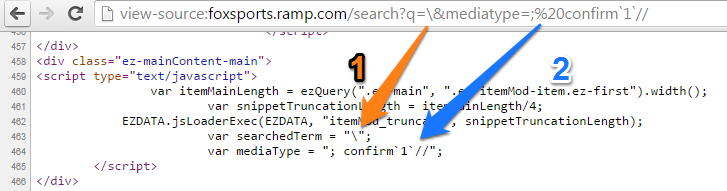
The screen-shot given below shows the reflection of our interest i.e., inside script block. Please note that it is not common to control two GET parameters while at the same time getting reflection back in both cases. The screen-shot also shows " and < from the probe string were filtered so we can not use options like "; confirm(1); ", "-confirm(1)-" and </script><script>confirm(1)</script> respectively. 


As I said earlier, in this case, we can control two GET parameters and by keeping this thing in mind lets inject \ in the 1st GET parameter and 2nd GET parameter will have the value ; confirm`1`;//. I explain the injected values later. The screen shot shows injection and has a label of 1 and 2 for 1st and 2nd GET parameters respectively.


The URL looks like: http://foxsports.ramp.com/search?q=\&mediatype=;%20confirm`1`;// and the following screen-shot shows "Uncaught Syntax Error" you will get when you will open the URL. Why Uncaught Syntax Error? I think because of  \, the closing " in the variable declaration becomes special character (or asks for special treatment because it is now an escaped double quotes) and then browser tries to find the matching " which is not their or missing. It results in an Uncaught Syntax Error and for the browsers it becomes unparseable script. Please keep in mind we need " in pair for JavaScript string variable declaration,


This was a close call because we're unable to XSS it BUT what if in the JavaScript source code snippet as shown in the above screen shot, the "mediatype" variable declaration was in the same line (no line break) as "searchedTerm"? I mean something like ...

<script type="text/javascript">

/* other code goes here*/

 var searchedTerm = "reflection-here";   var mediaType = "reflection-here";

</script>

In that case our attack payload as can be seen in the URL http://foxsports.ramp.com/search?q=\&mediatype=;%20confirm`1`;// will work and the culprit will be \ (given " and < are either filtered or encoded as was the case here). Some of you might be thinking how and why? I try to explain it. In the source code, the attack payload looks like ...

<script type="text/javascript">

/* other code goes here*/

 var searchedTerm = "\";   var mediaType = "; confirm`1`;//";

</script>

Why the above JavaScript code works (some of you already have an idea) and why this time there is no Uncaught Syntax Error given everything was same except mediaType variable declaration was not in a new line?  The answer can be seen in the following screen-shot. 1) By injecting \ as a part of variable searchedTerm, we force browser to consider " as a special character or escape character because developers're using " for JavaScript string variable declaration in this case. The browser will digest this " because of  \ and will continue digesting stuff (it also includes ; which is a statement terminator) until it finds the closing ".  The browser will find the plain " after = symbol of variable mediaType. At the end of day, the value of searchedTerm variable will be "; var mediaType =. The next thing is ; which is a statement terminator because this ; is after the matching " and this will close the statement. The ; earlier as a part of variable searchedTerm was not treated as statement terminator because in reality it was enclosed in a pair of double quotes. 2) The next thing is a simple proof of concept JavaScript execution via confirm`1`;. 3) Finally we have single line comments (//) and their job in the attack payload is to neutralizes the effect of at the end. The explanation above shows all stars have been aligned properly and that's why no Uncaught Syntax Error.


The \ is often not escaped or encoded in script context and even Google guys missed it on Google Developers site. The following URL results in an Uncaught Syntax Error: https://developers.google.com/s/results/?q=%5C. In this case, again it was a close call because as an attacker, we can not control the second parameter. When you're testing the web application, the other potential venue where you may leverage \ for XSS would be JSON. My quest for finding this particular XSS in the wild will continue ...

Acknowledgement: I would like to thank Joel Weinberger for some discussion on that. 

Sunday, December 20, 2015

Is Escaping an Option There?

In the real example cases, you will see in this post, escaping SHOULD NOT be the option ... please go for encoding. I found many instances of the following types of reflections in the wild where one SHOULD NOT use escaping but unfortunately it is there. Please open the following URL (Inquirer has a global Alexa rank of 1049 at the time of writing). The GET parameter q holds our probe string "xxxxxxxx'yyyyy</img


The screen-shot shows the reflection in an attribute context (i.e., value attribute of an <input> tag) and you will see that " and ' from the probe string are escaped i.e., \" and \' respectively. At the same time, </ is not controlled. 


In an attribute context, escaping is not a good choice. The developers're using " for the holding the value of value attribute and at the same time, they escaped " i.e., \". The developers think that they are done and it is not possible to break the context. Lets see one potential way (there are many) to XSS this. The XSS attack payload looks like "onmouseover=confirm(1)//. The URL at the time of XSSing is followed by screen-shot:


In the source code, the <input> tag looks like:

<input type="text" name="q" value="\"onmouseover=confirm(1)//" autocomplete="off" />

The more interesting thing is if you look at the innerHTML of the above mentioned <input> tag. This would give better picture why above mentioned XSS attack vector works given " are escaped in an attribute context. I used Live DOM Viewer made by Ian Hixie for this purpose. The innerHTML looks like ...

<input type="text" name="q" value="\" onmouseover="confirm(1)//&quot;" autocomplete="off">

For you to see and test it yourself, the short exercise would be why the following XSS attack payloads do not work? "onmouseover="confirm(1) and "onmouseover="confirm(1)//. Now we see another reflection where escaping SHOULD NOT be there but it is. Please open the following URL (BusinessInsider has a global Alexa rank of 7393 at the time of writing). The GET parameter s holds our probe string "xxxxxxxx'yyyyy</img.


The screen-shot shows the reflection of probe string in an HTML context (<h3> opening and closing tag is around reflection of probe string) and you will see that " and ' from the probe string are escaped i.e., \" and \' respectively. At the same time, </ is not controlled. In an HTML context, if < is not controlled (filtered or encoded) then game is over 99% of the time.


The URL at the time of XSSing looks like http://www.businessinsider.com.au/?s=%3Cimg%20src=x%20onerror=confirm%281%29;%3E followed by a screen-shot. This XSS is now fixed.


I was thinking what could be the reason of escaping " and ' in an attribute and HTML context? I think because of single XSS protection applied on a web application in general or they're using one XSS protection for all cases (escaping is good in script context e.g., JavaScript String Literal Case). The sad thing is that I found many instances of escaping in an attribute and HTML context in the wild. It is a common mistake. The context-specific case(s) was not in the mind.  If you can think of any other reason(s), please feel free to share as part of comment section below. At the same time, if you have a reason or justification that escaping can be applied in above mentioned cases (i.e., attribute and HTML context), then I would be very happy to see the real example(s) where it is working fine.

Update: Ouch ... Forward Slash for Escaping

Recently, I found a real life case where developers're using forward slash (/) for escaping double (") and single quotes (') respectively in an HTML context. As I said earlier in the post that escaping is not an option in an HTML and attribute context and at the same time, developers're using instead of \. The can be used as an escaper in an script context. Please open the following URL http://www.autos.ca/ and input XSS probe string "xxxxxxxx'yyyyy</img in the main search bar. The screen-shot given below shows the reflection.


The URL at the time of XSSing is given below followed by a screen-shot. The XSS in this case is very simple because </ is not filtered or encoded in an HTML context.